Homerealm in your game
Everything Homerealm adds to World of Warcraft, part by part, each as it looks in your game. Turn each one on or off under Homerealm in the game's Options. All of it is free.
Get Homerealm
Every part below comes in the one download, made for each game client it runs on.
- ForeverHomerealm 0.31.3 For everyoneHomerealm 0.46.4 For testers
Unzip it into your game's Interface\AddOns folder. Or let the Homerealm app set it up and keep it up to date by itself, with one line: on Windows, in PowerShell, irm https://homerealm.gg/install.ps1 | iex; on macOS, in Terminal, curl -fsSL https://homerealm.gg/install.sh | sh.
Info bar
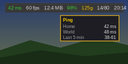
Ping, frame rate, memory, durability, gold, bag space and the time in a slim bar along the top.
Runs on Forever · On from the start · For testers
More about it
A slim bar along the top of your screen with your ping, frame rate, memory, durability, gold, bag space, the time and your claim; point at a part for more. A part of Homerealm, switched on and set up under Homerealm in Options.

Windows
Put the game's windows where you want them: drag, scale and resize each, kept for you or each character.
Runs on Forever · On from the start · For testers
More about it
The game's windows where you put them: Arrange Windows (Homerealm's Windows page in Options, or /homerealm move) lets you drag each window, scale it with the mouse wheel, resize it where its contents follow and right-click to put it back. Places kept for your account or for each character, as you choose. Edit Mode places the rest of the interface; windows that are protected move only out of combat.
Tooltips
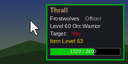
The game's tooltips telling more at a glance: class colours, guild rank, target, health as numbers, item level.
Runs on Forever · On from the start · For testers
More about it
Better tooltips, still the game's own: they sit where the game puts them or follow your pointer; player names in their class colour and the border in the reaction's; a guild's rank beside its name; who a unit is targeting, and who of your group targets it; health in numbers on its bar; item level for players and gear; and a compact look without the faction and PvP lines. Each one switched on its page under Homerealm in Options.
Instances
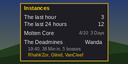
Your dungeon and raid runs, your entries in the last hour and 24 hours, and every character's lockouts.
Runs on Forever · On from the start · For testers
More about it
Your dungeon and raid runs: when you went in, how long, the bosses you killed, how many instances you have entered in the last hour and the last 24 hours, the game's limit once it has turned you away, and every character's lockouts. A part of Homerealm, switched on and set up under Homerealm in Options.
Journey
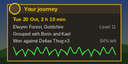
Your sessions, places, people and fights in a window of the game's own; replay any fight.
Runs on Forever · On from the start · For testers
More about it
Your journey in the game, opened from Homerealm: /homerealm journey, its key under Key Bindings, Homerealm, or its page in Options.
Download
Forever- 0.46.4 For testers
- 0.46.3 For testers
- 0.46.2 For testers
- 0.43.0 For testers
- 0.41.1 For testers
- 0.38.0 For testers
- 0.37.0 For testers
- 0.35.0 For testers
- 0.34.0 For testers
- 0.33.1 For testers
- 0.33.0 For testers
- 0.32.3 For testers
- 0.32.2 For testers
- 0.32.1 For testers
- 0.32.0 For testers
- 0.31.3 For everyone
- 0.31.2 For testers
- 0.31.1 For testers
- 0.31.0 For testers
- 0.30.2 For testers
- 0.30.1 For testers
- 0.30.0 For testers
- 0.29.0 For testers
- 0.28.0 For testers
- 0.27.0 For testers
- 0.26.0 For testers
- 0.25.0 For testers
- 0.24.0 For testers
- 0.23.0 For testers
- 0.22.0 For testers
- 0.21.1 For testers
- 0.21.0 For testers
Each is the whole of Homerealm, this part with it.
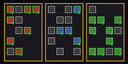
Talent planner
Every class's talent trees with the game's own icons; try a build by level and share it by its link.
Runs on Forever · On from the start · For testers
More about it
A talent planner inside the game: every class's talent trees as Forever has them, with the game's own icons and tooltips, points by level, a build kept for each character and a link the website's talent calculator opens. Opened from Homerealm's page in Options, its minimap button's menu or /homerealm talents.
Download
Forever- 0.46.4 For testers
- 0.46.3 For testers
- 0.46.2 For testers
- 0.43.0 For testers
- 0.41.1 For testers
- 0.38.0 For testers
- 0.37.0 For testers
- 0.35.0 For testers
- 0.34.0 For testers
- 0.33.1 For testers
- 0.33.0 For testers
- 0.32.3 For testers
- 0.32.2 For testers
- 0.32.1 For testers
- 0.32.0 For testers
- 0.31.3 For everyone
- 0.31.2 For testers
- 0.31.1 For testers
- 0.31.0 For testers
- 0.30.2 For testers
- 0.30.1 For testers
- 0.30.0 For testers
- 0.29.0 For testers
- 0.28.0 For testers
Each is the whole of Homerealm, this part with it.

Claim your character
One press links this character to your Battle.net account, so its journey is yours on the website.
Runs on Forever · On from the start · For testers
More about it
Claim your character: one press links this character to the Battle.net account your game is signed into, so its journey is yours on the website. A part of Homerealm, switched on and set up under Homerealm in Options.
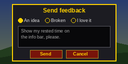
Feedback
Tell us what to make better, in your own words, without leaving the game.
Runs on Forever · On from the start · For testers
More about it
Send feedback from inside the game: an idea, something broken or something you love, in your own words. A part of Homerealm, switched on and set up under Homerealm in Options.
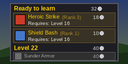
Trainers
What your class and profession trainers teach, at which level and for how much, and what comes next.
Runs on Forever · On from the start · For testers
More about it
What your trainers teach, for your class and each of your professions: ready to learn now, what comes next level by level and the gold it takes, what you know already, and where you last found each trainer. Opens beside each trainer you speak to, by /trainers, or from its page under Homerealm in Options.
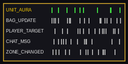
Event recorder
Notes which of the game's events happen and when, kept in your saved files to make Homerealm better.
Runs on Forever · Off until you turn it on · For testers
More about it
Notes which of the game's events happen and when while you play, to make Homerealm better. What it notes stays in Homerealm's saved files on your computer, is never shown in the game and is sent nowhere. Off unless you turn it on.